When Cloudflare Blocks AI Crawlers
Your analytics can look healthy while ChatGPT, Claude, and Perplexity cannot fetch your important pages.
Your SEO dashboard can look healthy while AI systems cannot read the pages that matter.
That is the uncomfortable lesson from Jason Grad's LinkedIn case study about a Brooklyn law firm that reportedly had major AI crawlers blocked after moving behind Cloudflare.
The exact numbers in that story belong to that site, that market, and that time window. Do not treat them as a universal benchmark.
But the operating lesson is much broader:
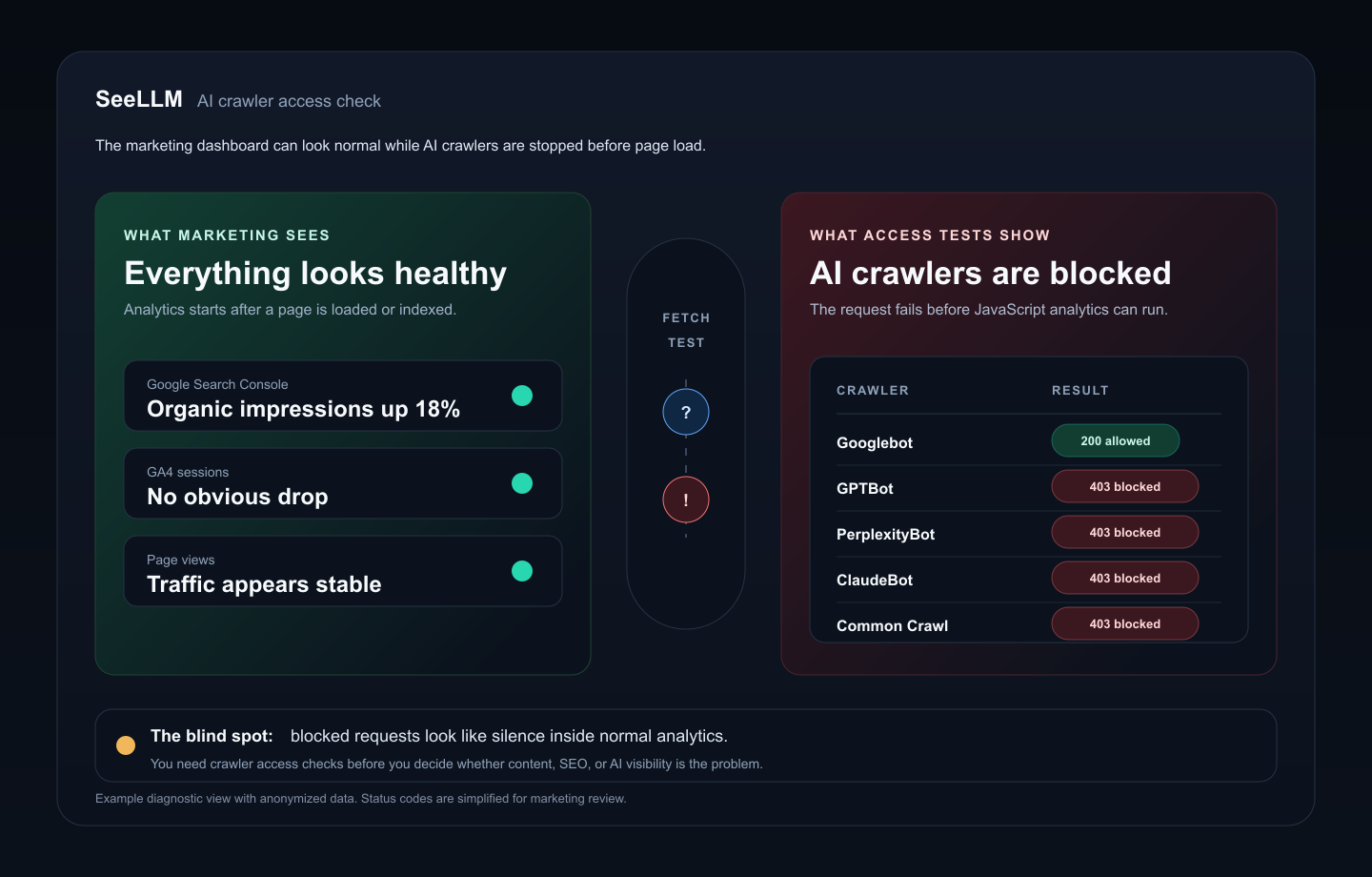
If an AI crawler is blocked before it reaches your site, the visit never becomes a normal analytics session.
Google Search Console can still look fine. GA4 can still look fine. Search rankings can still climb. The blind spot is earlier in the chain: can AI systems fetch the page at all?
The marketer-friendly version of the problem
Most marketers do not think in HTTP status codes.
They think in pages:
- Is our pricing page visible?
- Can AI tools read our comparison pages?
- Are our docs being picked up?
- Did the new landing page become easier or harder for AI systems to use?
- Are we blocked on one platform but visible on another?
That is why raw bot logs are not enough.
A security team can read 403s, user agents, WAF events, and robots.txt rules. A content or growth team needs a simpler view:
Which important URLs can each crawler reach?
That question is the bridge between technical access and marketing action.
Why normal analytics can miss blocked AI crawlers
Browser analytics usually start after a page loads in a human visitor's browser. Many AI crawler requests do not execute analytics JavaScript. They request HTML, parse content, and leave.
So if a crawler is stopped by a CDN, WAF rule, robots.txt directive, bot control feature, or rendering problem, the absence can be hard to notice.
You may see:
- normal Google organic traffic
- stable page views
- no obvious drop in GA4
- no clear alert in your marketing dashboard
What you will not necessarily see is the failed pre-session request from GPTBot, ClaudeBot, PerplexityBot, or another crawler.
Cloudflare's own documentation makes this a product surface now. AI Crawl Control lets site owners view and allow or block AI crawlers. Cloudflare also documents AI crawler metrics and notes that free-plan metrics are limited to a short window. Its managed robots.txt setting can add AI-related directives to the robots.txt response.
Those controls can be useful. They can also create a measurement gap if marketing does not know they exist.
Start with one URL, not the whole site
The first question is not "how is our AI SEO?"
The first question is:
Can an AI system fetch and use this specific page?
Pick one page tied to pipeline or revenue:
/pricing- a comparison page
- a service page
- a category page
- a docs entry point
- a high-intent blog post
Then run a simple access and readability check.
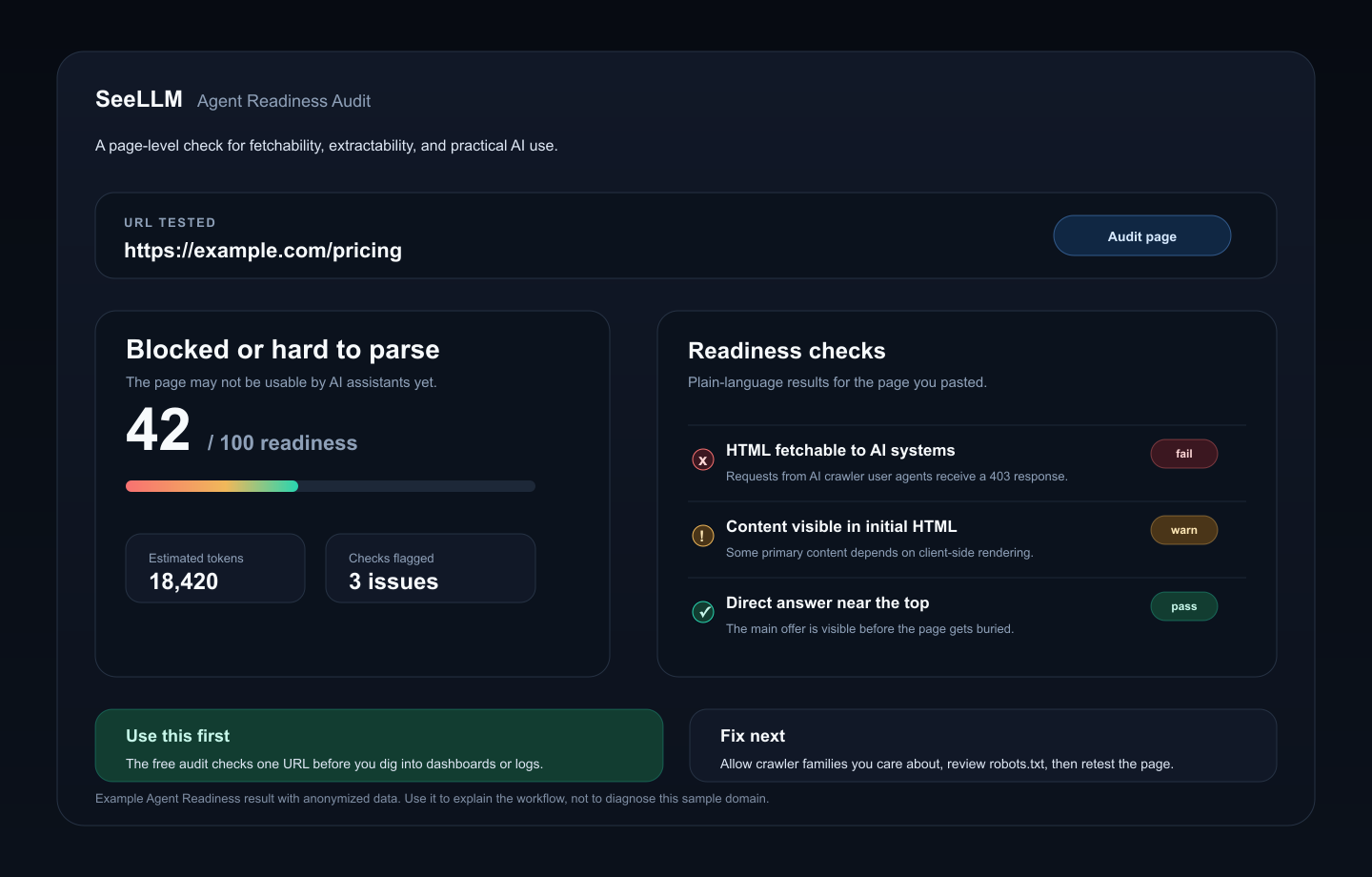
SeeLLM's free Agent Readiness Audit checks whether an AI assistant can fetch the page, whether useful content appears in the HTML, whether the page is likely to fit a practical token budget, whether the direct answer is buried, and whether JavaScript creates avoidable extraction risk.
That does not prove ChatGPT will cite you.
It proves step zero: the page is not obviously unreadable before optimization begins.
The dashboard view marketers actually need
A one-URL test is useful for triage. For ongoing work, marketing teams need page-level coverage across the URLs that matter.
The executive view should answer:
- How much of the important URL inventory has any AI crawler evidence?
- Which crawler families are active?
- Which platforms have broad coverage?
- Which platforms are missing from important page types?
- How many URLs have no observed AI crawler evidence?
That is where a crawler coverage summary helps.
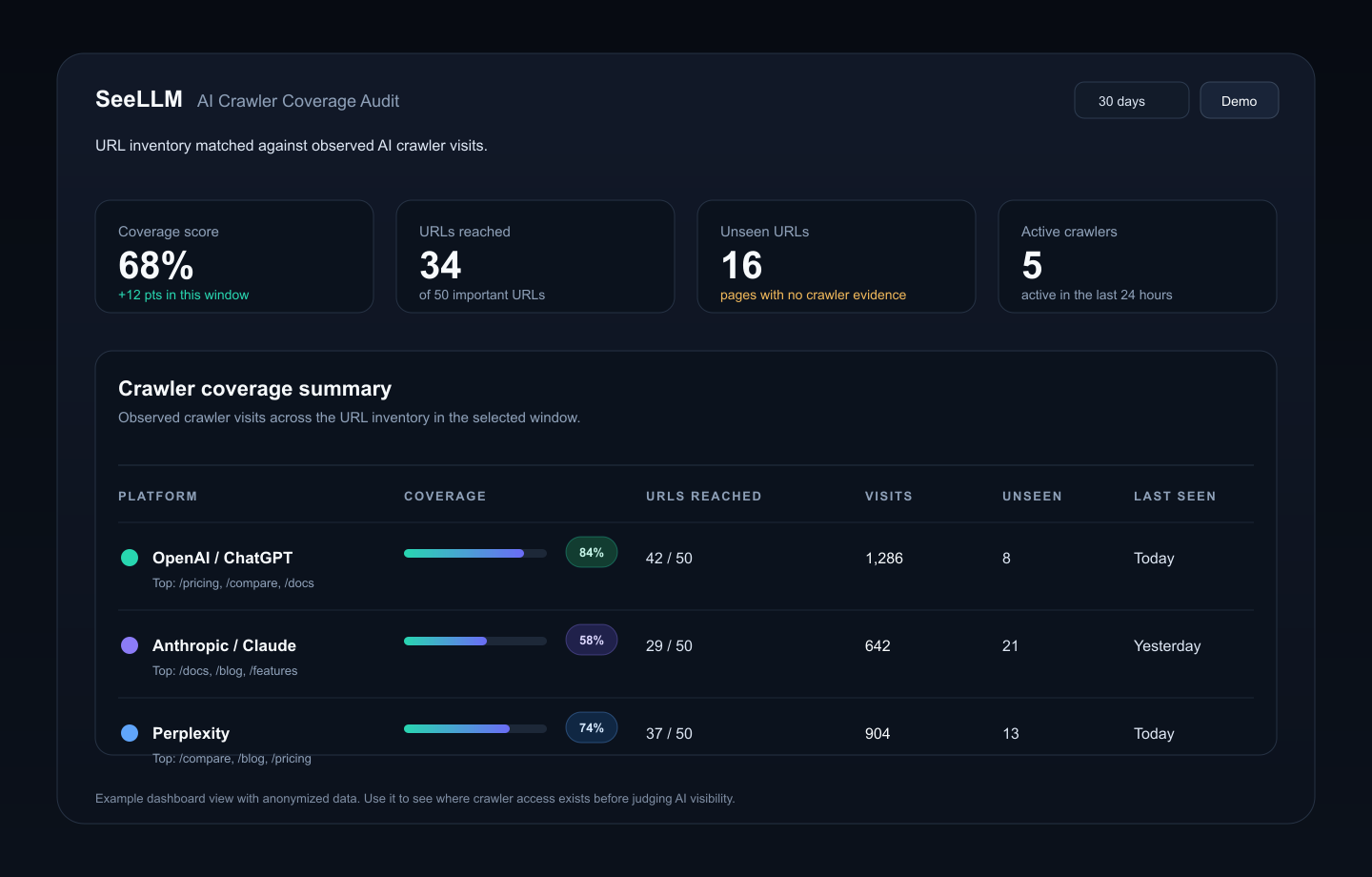
This view is useful because it does not force the team to reason from raw request logs.
Instead of asking, "What did this user agent do?", the team can ask, "Which crawler families reached our important URLs this month?"
The URL coverage matrix is where the work starts
The summary tells you whether the site has a broad access problem.
The URL coverage matrix tells you where to act.
This is the difference between a dashboard and an operating workflow. A domain-level number can start the conversation, but a row-level matrix tells a marketer which page to open next.
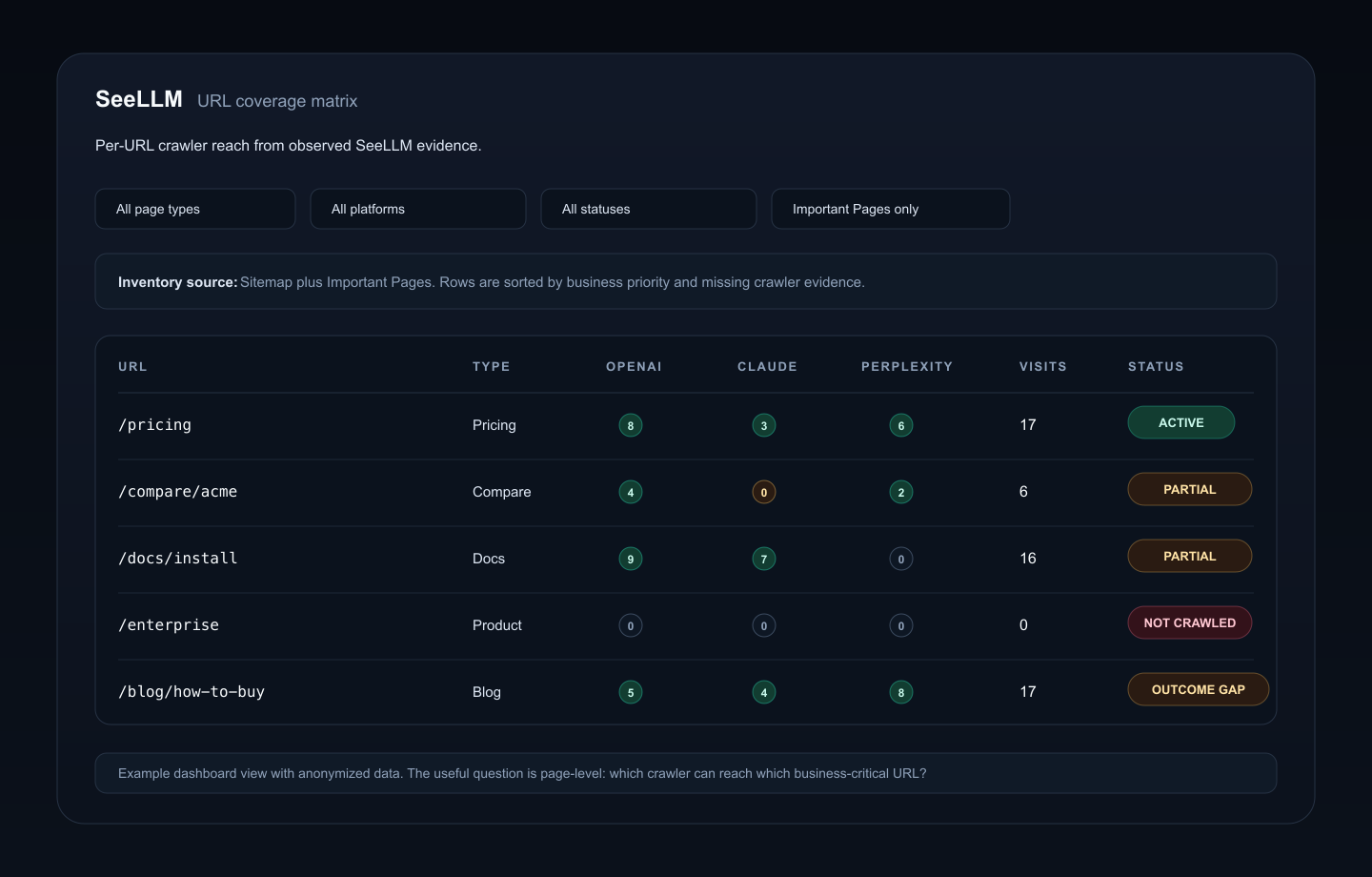
A useful matrix separates pages by business role:
- pricing
- product
- docs
- comparison
- blog
- category
Then it shows crawler evidence by platform.
That matters because "AI traffic" is not one thing. OpenAI, Anthropic, Perplexity, Google, Bing, and other crawler families behave differently. A page can be visible to one platform and absent from another.
The action list becomes obvious:
- A pricing page with OpenAI, Claude, and Perplexity evidence may be ready for reuse diagnosis.
- A comparison page missing Claude may need access, linking, or discovery checks.
- A docs page missing Perplexity may need sitemap or internal-link review.
- A product page with zero crawler evidence should be checked before rewriting copy.
- A blog post with strong crawler activity but no referrals or citations may be a
crawled but not citedcandidate.
That is the layer marketers need. Not more bot trivia. Not a bigger traffic number. A page list with a next action.
What to check if a crawler is missing
When an important page has no crawler evidence, do not jump straight to writing more content.
Check access first:
- Does the URL return a clean
200response? - Is the canonical URL correct?
- Is the page blocked in
robots.txt? - Is a CDN or WAF returning
403to known AI crawlers? - Is Cloudflare AI Crawl Control allowing the crawler families you care about?
- Is Cloudflare managed
robots.txtadding directives you did not expect? - Is the main content available in initial HTML, or hidden behind JavaScript?
- Is the page discoverable from sitemap and internal links?
Only after that should you diagnose content quality.
For the page-level operating loop, read How to Monitor Important Pages for AI Reuse. For the analytics blind spot, read Why Google Analytics Can't See AI Visibility.
Do not turn crawler volume into fake certainty
Crawler access is not the same as AI visibility.
A crawler can fetch a page and still never cite it. A page can be reachable and still too vague, too slow, too generic, or too buried for an answer system to use confidently.
That is why the measurement chain matters:
| Layer | Question |
|---|---|
| Access | Can the crawler reach the page? |
| Readability | Can the system parse useful content from the page? |
| Coverage | Which important URLs have crawler evidence? |
| Reuse | Does the page appear in answers, citations, summaries, or referrals? |
| Outcome | Did that exposure create qualified traffic, pipeline, or customer conversations? |
Do not collapse those layers into one "AI SEO score."
The first job is to avoid silent failure. The second job is to improve the pages that are accessible but not useful enough to reuse.
A practical workflow for marketing teams
Here is the workflow we recommend:
- Choose 10 to 50 important URLs tied to revenue, evaluation, or support.
- Run a one-URL Agent Readiness Audit on the highest-risk page.
- Check crawler coverage by platform across the full important page set.
- Split pages into
not crawled,partial coverage,active, andoutcome gap. - Fix access problems before rewriting content.
- Fix extractability problems before publishing more pages.
- Watch whether crawler coverage, citations, or referrals change after edits.
This keeps AI visibility work grounded.
You are not asking marketers to learn log analysis. You are giving them a page-level map:
This page is reachable. This one is missing Claude. This one is being crawled but not reused. This one needs a fix.
The next customer may ask before they search
People do not only search anymore. They ask.
They ask ChatGPT which vendor to compare. They ask Perplexity for a short list. They ask Claude to summarize docs. They ask Copilot to explain a category.
If those systems cannot read your important pages, the best-written page on your site may never enter the answer.
Start with the boring question:
Can AI systems fetch and use the page?
Run the free Agent Readiness Audit on one important URL. Then use crawler coverage to move from a one-page check to a repeatable monitoring workflow.
Continue reading
More from the field notes
June 06, 2026
How to Track AI Referral Traffic from ChatGPT, Perplexity, Gemini, and Claude
A practical measurement guide for separating AI bot visits, citation evidence, and referral sessions so content and SEO teams can see which AI tools actually send traffic.
June 02, 2026
Do AI Bots Fetch llms.txt? A Small Server-Log Check
We checked 30 days of server logs from two monitored domains. AI crawlers fetched robots.txt and sitemap.xml, but not llms.txt.
April 27, 2026
How to Monitor Important Pages for AI Reuse
A practical page-level workflow for comparing classified crawler requests with sampled citations, quoted text, and detectable AI referrals.
From reading to action
See which pages AI systems can actually use.
Start with the free AI Visibility Score. When you need page-level evidence, move from static checks to monitoring the pages that matter.